What is Form 3921?
Form 3921 is an IRS form used to report the exercise of an incentive stock option (ISO) by an employee in the last tax year. Officially titled “Exercise of an Incentive Stock Option Under Section 422(b),” Form 3921 documents and reports the details of the transaction to the Internal Revenue Service to ensure accurate tax reporting and compliance for your company and determine when the alternative minimum tax (AMT) applies.
Your company must file one form for each individual ISO exercise within the calendar year and provide a copy of Form 3921 to each applicable shareholder.
Form 3921 includes the following transaction details:
The date the option was granted
The date the option was exercised
The exercise price per share
The fair market value per share on the exercise date
The number of shares transferred
If you miss the filing deadline, fail to file, or make significant mistakes on the forms, your company could end up paying fines—up to millions of dollars in the worst-case scenario—for tax year 2025. Below, we’ll walk you through everything you need to know to file annual tax Form 3921s on time in 2026.
Note that this article is for informational purposes only, and does not constitute legal, financial, accounting, or tax advice. You should consult a qualified professional advisor before making any decision or taking any action that may affect your business or interests. You further agree and acknowledge that this document has not been prepared with your specific circumstances in mind and may not be suitable for use in your business. Carta does not assume any liability for reliance on the information provided herein.
How to file Form 3921
You can file Form 3921 either by mail (deadline: March 2) or online (deadline: March 31). To file, you’ll need three different copies of this form:
File copy A with the IRS, either electronically or by mail
Give copy B to the employee who exercised options
Keep copy C for your company’s records
If you need to file 10 or more Form 3921s or other information returns, you must file them electronically by March 31, 2026, for the tax year 2025. Either way, you’ll need to compile the following information to get started:
A list of which employees completed an exercise of an ISO in the previous calendar year
Those employees’ tax ID numbers, full names, and addresses
Your company’s transmitter control code (TCC)
If filing online, you’ll also need an account on the IRS’s Filing Information Returns Electronically (FIRE) system
Filing online
If it’s your first time filing online, you’ll need to electronically file Form 4419 so the IRS can assign you a TCC, which will allow you to set up a FIRE account. This may take a few weeks, so you’ll want to start the process at least 45 days before the deadline (so around November 1, 2025, in time for February 14, 2026, for the 2025 tax year).
Filing by mail
If you choose to file by mail, you cannot print out the forms yourself and send them in. Unique IRS machines process the forms and can only read IRS-supplied paper, which you can order on IRS.gov.
Filing through Carta
If you use Carta to prepare Form 3921, filing is easy thanks to an automated process and step-by-step guide. When filing automatically with Carta, we require two additional pieces of information:
Each employee’s email address to distribute Copy B of the form automatically*
Your company’s fair market value (FMV) as of the date of exercise to determine taxation based on the difference between the FMV and the exercise price employees paid
*Note that your company needs to obtain the stockholder's consent to electronic delivery of the Form 3921 on their own (this is not available through Carta)
Form 3921 deadlines
There are three key deadlines to know for filing Form 3921 on time:
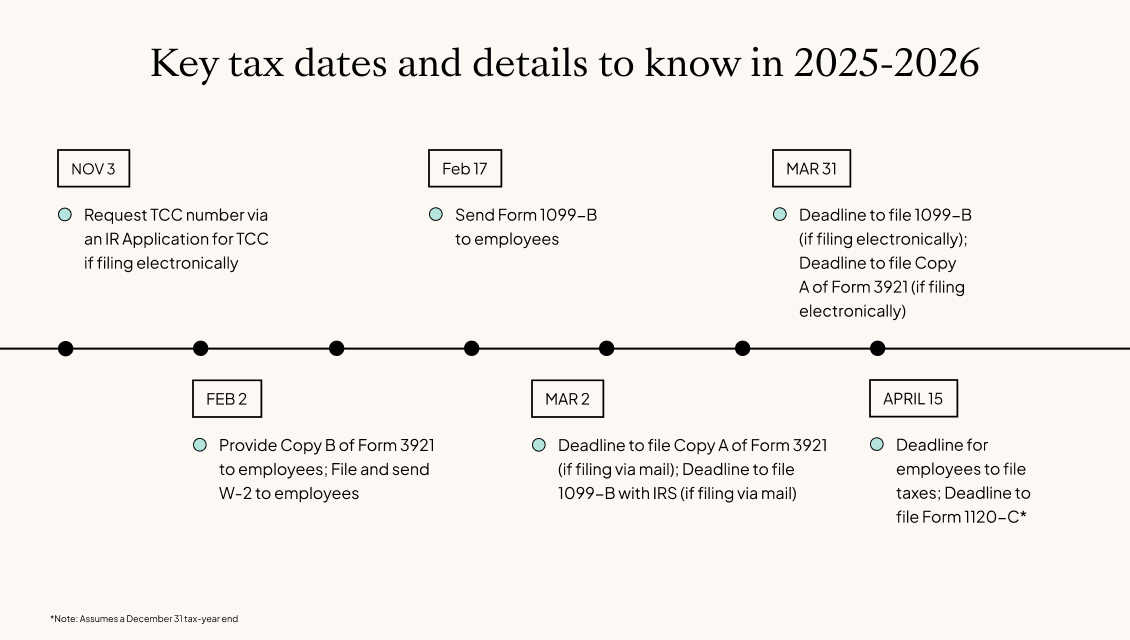
February 2: Deadline to provide copy B to all employees who exercised ISOs in the previous year
March 2: Deadline to file copy A with the IRS if filing on paper
March 31: Deadline to file copy A with the IRS if filing electronically
→ Prepare for tax filing season with free, helpful resources from Carta.
If an IRS filing deadline falls on a holiday or weekend, the deadline is automatically extended to the following business day.
If you don’t file the correct information by February 28 (paper) or March 31 (e-file), you’ll likely pay a penalty. How much you pay depends on when you file the correct form. Note that the penalty amounts below are for 2025, and penalty amounts for 2026 may be increased by the IRS.
If you file correctly:
Within 30 days after the due date
You’ll pay $60 per form (that is, per employee who exercised an ISO). The maximum penalty is $630,500 per year, or $220,500 for small businesses (that is, any startup or other business with an average of $5 million or less taxable income for the last three years).
More than 30 days after the due date, but by August 1
You’ll pay $120 per form. The maximum penalty is $1,891,500 per year, or $630,500 for small businesses.
After August 1, or if you never correctly file
You’ll pay $310 per form. The maximum penalty is $3,783,000 per year or $1,261,000 for small businesses. But if the IRS finds that your company intentionally disregarded the deadline, they might impose the maximum fine of $630 per form. This penalty is uncapped regardless of business size.
Penalties only apply if you don’t file or if there are material errors on the submitted forms. For example, if the payee’s taxpayer identification number or surname is incorrect and prevents the IRS from processing the return, you’ll get fined. The maximum penalty increases each year.
Carta generates Form 3921 in one click
Don’t get stuck paying fines or waiting for IRS paper to arrive in the mail. You can generate all your 3921s in seconds with Carta’s 3921 product. When your cap table is on the platform, it automatically tracks when employees exercise ISOs. When tax season comes around, Carta’s system generates three copies of each form. You can deliver copy B to employees with one click and store copy C on the platform for your records.
When you file Form 3921 online with Carta, everything you need is in one place. Just download 3921 copy A and find your TCC code in your settings. From there, it’s a matter of following the general instructions on the IRS website.
Note that your company needs to obtain the stockholder's consent to electronic delivery of the Form 3921 on their own (this is not available through Carta).

DISCLOSURE: This communication is on behalf of eShares, Inc. dba Carta, Inc. ("Carta"). This communication is for informational purposes only, and contains general information only. Carta is not, by means of this communication, rendering accounting, business, financial, investment, legal, tax, or other professional advice or services. This publication is not a substitute for such professional advice or services nor should it be used as a basis for any decision or action that may affect your business or interests. Before making any decision or taking any action that may affect your business or interests, you should consult a qualified professional advisor. This communication is not intended as a recommendation, offer or solicitation for the purchase or sale of any security. Carta does not assume any liability for reliance on the information provided herein. ©2026 Carta. All rights reserved. Reproduction prohibited.